CAST Open Source Software Knowledgebase
Introduction
CAST OSS Knowledgebase is a centralized repository of open-source software intelligence used across multiple CAST products. It is a core component of CAST Highlight’s Software Composition Analysis (SCA) capabilities. The knowledgebase helps you to:
- Detect and manage OSS components in your codebase.
- Identify licenses, vulnerabilities (CVEs), and transitive dependencies.
- Assess component lifespan (active, deprecated, immature).
- Generate License Risk Profiles.
- Get safe version recommendations for OSS components.
Use Knowledgebase with CAST Highlight
CAST SBOM Manager leverages the OSS Knowledgebase to enrich SBOMs with insights from CAST Highlight. When you import a CAST Highlight CSV ZIP archive, the OSS Knowledgebase automatically enhances the data with component metadata, license details, vulnerabilities, and versioning information.
Use Knowledgebase when creating SBOM project
Another option is to configure how your project is scanned from the start. In our initial guide, we covered scanning declared dependencies (e.g., from pom.xml). However, the OSS Knowledgebase can be more deeply integrated into the initial scan of project files.
This will allow you to scan project files for corresponding matches in the knowledgebase. There are three corresponding options to fine-tune the scan:
- Only known – Matches only components already present in the Knowledgebase.
- Filtered results – Matches trusted components (e.g., those with over 500 GitHub stars) to reduce false positives.
- Full scan – Performs an unfiltered scan for maximum coverage.
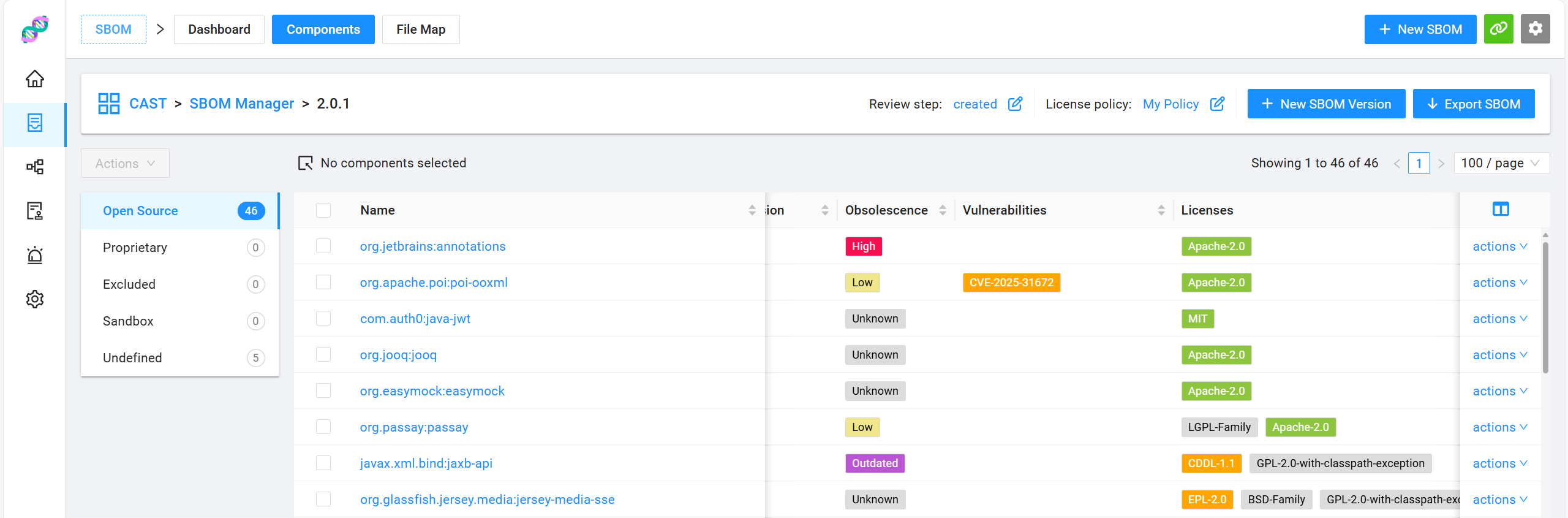
Using the OSS Knowledgebase during the initial scan provides enriched component data from the start. As shown in the screenshot, each component includes:
- Latest version from the Knowledgebase
- Obsolescence status based on version comparison
- Known vulnerabilities (CVEs, GitHub and GitLab advisories, etc.)
- Associated licenses
You can always edit component metadata in SBOM Manager to reflect internal decisions or proprietary information.