Step 3: Packages
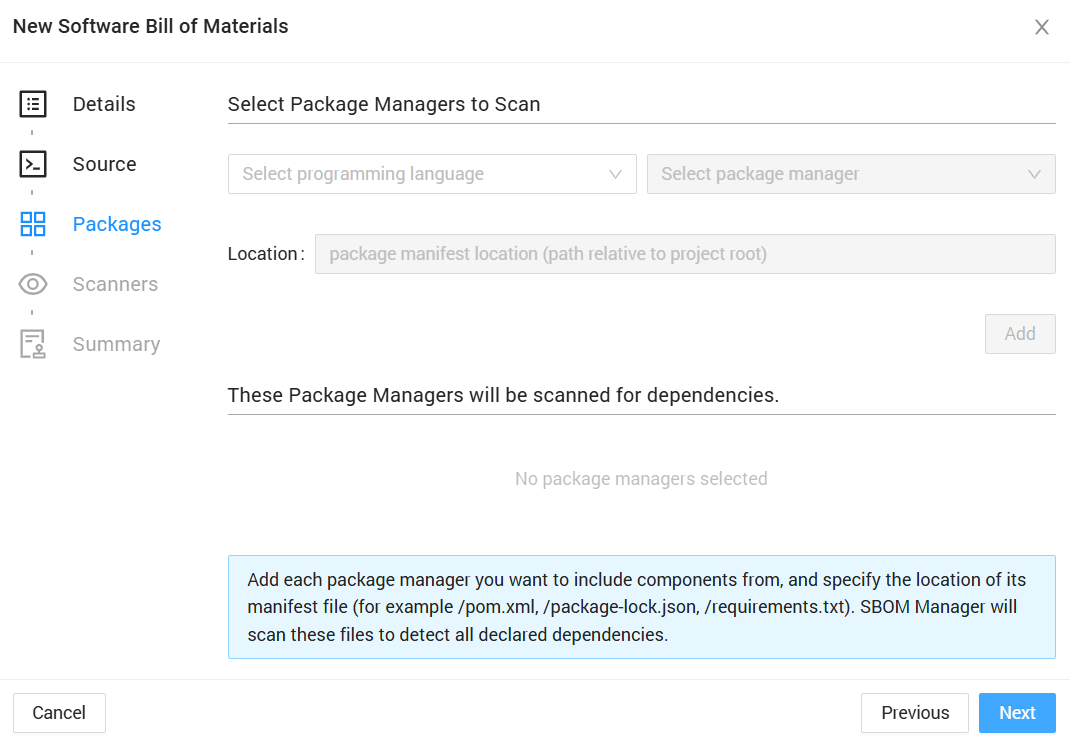
The Packages step enables automatic detection and import of declared dependencies from package manager manifest files.
Available Package Scanners
CAST SBOM Manager supports the following package managers:
Maven (Java)
- Default file:
pom.xml - Detects: Direct dependencies
- Includes: All scopes (compile, runtime, test, provided)
- Learn more about Maven scanning
Gradle (Java)
- Default file:
gradle.lockfile(fallback:build.gradle) - Detects: Direct and transitive dependencies (lock file) or direct dependencies only (fallback)
- Includes: All configurations
- Learn more about Gradle scanning
NPM (JavaScript/TypeScript)
- Default file:
package-lock.json(fallback:package.json) - Detects: Direct and transitive dependencies (lock file) or direct dependencies only (fallback)
- Includes: Production dependencies
- Learn more about npm scanning
Yarn (JavaScript/TypeScript)
- Default file:
yarn.lock(fallback:package.json) - Detects: Direct and transitive dependencies (lock file) or direct dependencies only (fallback)
- Includes: All resolved dependencies
- Learn more about Yarn scanning
pip (Python)
- Default file:
requirements.txt - Detects: Direct dependencies
- Includes: All declared packages with exact versions when specified
- Learn more about requirements.txt scanning
Pipenv (Python)
- Default file:
Pipfile.lock - Detects: Direct and transitive dependencies
- Includes: Production dependencies (default section only)
- Note: Standalone
Pipfileis not supported, only the lock file - Learn more about Pipfile.lock scanning
Poetry (Python)
- Default file:
poetry.lock - Detects: Direct and transitive dependencies
- Includes: All dependencies (main and dev)
- Learn more about poetry.lock scanning
uv (Python)
- Default file:
uv.lock - Detects: Direct and transitive dependencies
- Includes: All resolved dependencies
- Learn more about uv.lock scanning
Composer (PHP)
- Default file:
composer.lock - Detects: Direct and transitive dependencies
- Includes: Production and development packages
- Learn more about Composer scanning
Bundler (Ruby)
- Default file:
Gemfile.lock(fallback:Gemfile) - Detects: Direct and transitive dependencies (lock file) or direct dependencies only (fallback)
- Includes: All gem groups
- Learn more about Bundler scanning
Cargo (Rust)
- Default file:
Cargo.lock - Detects: Direct and transitive dependencies
- Includes: All dependencies and dev-dependencies
- Learn more about Cargo scanning
NuGet (.NET)
- Default file:
.csproj - Detects: Direct dependencies
- Includes: All package references
- Learn more about NuGet scanning
Adding Package Scanners
To add a package scanner:
- Select programming language - Choose the language from the dropdown (Java, JavaScript, Python, etc.)
- Select package manager - Choose the specific package manager for that language
- Location (Optional) - Specify the path to the manifest file relative to project root
- Leave empty to use the default file location
- Examples:
/pom.xml,/backend/package-lock.json,/requirements.txt
- Add - Click the "Add" button to add the scanner to your configuration
Repeat this process for each package manager you want to include.
Multiple Package Managers
You can add multiple package managers to scan different parts of your project:
- Single-module projects: Add one package manager for the main manifest file
- Multi-module projects: Add multiple scanners for the same package manager with different paths
- Example: Java project with
backend/pom.xmlandfrontend-java/pom.xml - Example: Python project with
api/requirements.txtandworker/requirements.txt
- Example: Java project with
- Multi-language projects: Add different package managers for different languages
- Monorepos: Add package managers for each module or service, mixing languages as needed
- Custom paths: Specify exact manifest file locations for nested or non-standard project structures
How Package Scanners Work
- SBOM Manager searches the imported source for package manifest files
- Manifest files are parsed to extract declared dependencies
- Dependencies are added as components in your SBOM
- Initial component status is set to Undefined
- Component details can be enriched later using the Knowledge Base
WARNING
Package scanners only detect declared dependencies from manifest files. They do not detect:
- Copy-pasted code from open source projects
- Manually included libraries not in manifest files
Use the Scanners step (next) to detect undeclared open source components.
Click Next to proceed to file scanner configuration.